.png)

The Spreadsheet That Runs Your Company
Somewhere in your company there is a spreadsheet that would stop the business if it broke on a Monday morning. You may not know which one it is. Someone in finance or operations knows exactly.
At one client, a manufacturer, it was the pricing file. Forty tabs, fifteen years of history, and a wall of formulas written by a colleague who had retired two summers earlier. Every quote the sales team sent started its life in that file. It lived on a shared drive, and its name ended in FINAL_v7.
Nobody decided that a spreadsheet should run pricing. That is the important part, and it is the same story in every company I have seen.
It starts as a personal helper. Someone builds a file to save themselves an hour a week. It works, so a colleague asks for a copy. The copy becomes a shared file. The shared file grows tabs, then macros, then an export that feeds a report the management team reads every month. Three years later it is infrastructure, and no meeting ever approved that.
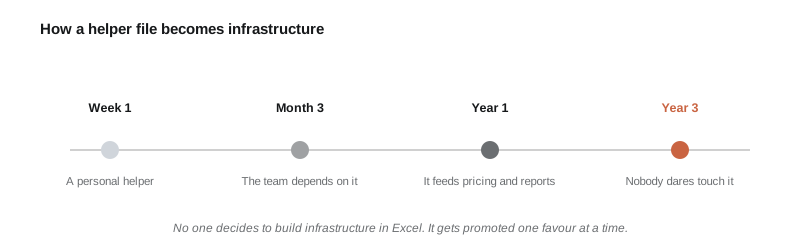
The promotion happens one favour at a time.
To be clear, this is not an argument against spreadsheets. A spreadsheet is the best prototyping tool ever put in front of business people. The person who built that pricing file solved a real problem with the tools they had, faster than any software project would have. The problem is not the file. The problem is that a prototype got promoted into infrastructure and nobody noticed the promotion.
Infrastructure has duties a prototype does not. It should survive its author leaving. It should refuse bad input. It should keep history, cope with two people working at the same time, and fail loudly instead of silently. A spreadsheet does none of this out of the box, and bolting it on afterwards is harder than people expect.
The risk picture is what makes me nervous. Your ERP and accounting systems have backups, access control, and an upgrade path. The pricing file has more influence on actual decisions than half of those systems and none of their protections.
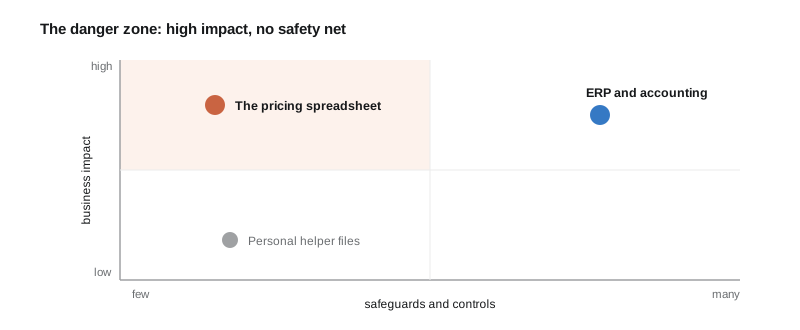
High business impact, few safeguards. That corner is where the surprises come from.
How do you tell that a helper file has crossed the line? A few signs, any two of which are enough. More than two people use it regularly. Copies travel by email with version numbers in the filename. It feeds a number the management team looks at. It contains formulas only one person understands. And when it breaks, someone outside the department notices.
If that describes a file in your company, this is what I would do, and what I would avoid.
Start with an inventory. Ask every department head for the files that would hurt if they were lost or wrong for a month. This takes a week of asking and fits on one page. Most companies find ten to twenty serious candidates and one or two frightening ones.
Rank them by damage, not by size or age. The question is simple. If this file was wrong for a month before anyone noticed, what would it cost? Files that price products, calculate pay, or feed regulatory reports go to the top of the list.
Then replace one at a time, and move the logic before you move the habit. Put the rules and the data somewhere safer, a small internal tool or a database with a clean screen, and let the spreadsheet survive for a while as the familiar face in front of it. People accept a migration that respects their routine and resist one that does not.
Resist the urge to fix it with one giant suite purchase. The file exists because the official system could not do the job, or made it too slow. Buying a bigger official system without answering why usually produces a bigger gap and a new spreadsheet.
Keep the author close. That file holds a decade of business rules that are written down nowhere else. Getting those rules out of the formulas and into documentation is half the value of the project. The software is the other half.
If a full replacement is not realistic this quarter, at least take the cheap insurance. Move the file somewhere with automatic version history, restrict who can edit the formula tabs, and write one page that explains what goes in, what comes out, and who to call. That is a day of work and it removes the worst of the panic.
The manufacturer's story ended fine, but not before it got expensive. A formula error priced one product family two percent under cost for five months before a margin report gave it away. The replacement project cost less than that single mistake. Nobody there talks about the file in the past tense with any nostalgia.
So ask the question this week. Which file is load-bearing in your company, who owns it, and what happens when it breaks? Finding out on your own schedule is much cheaper than finding out on a Monday.
Questions I hear about critical spreadsheets
When should a company replace a spreadsheet with software?
When more than two people rely on it, when it feeds decisions the management team acts on, or when an error in it would cost real money before being noticed. At that point the file is infrastructure, and it needs the properties of infrastructure: validation, history, access control, and an owner.
What are the risks of business-critical spreadsheets?
Silent formula errors, broken links after renames, knowledge that lives in one person, no record of who changed what, and copies drifting apart by email. None of these stop the file from producing a number. They stop the number from being right, which is worse.
What is the best way to migrate off a critical spreadsheet?
One file at a time. Move the rules and the data into a validated system first, keep a familiar interface during the transition, and document the business rules as you extract them. Avoid replacing a working file with a big suite purchase before understanding why the file exists at all.
Are spreadsheets bad for business processes?
No. They are excellent prototypes and fine for personal analysis. They become a problem only when a prototype is promoted into shared infrastructure without anyone deciding it, because then critical logic lives in a tool with no safeguards.